


Win Plus
3.26.00 Reviews
App Specs
- Version
- 2.6.0
- Updated On
- License
- Free
- Downloads
- 50,000+
- Developer
- SETIA
- Categories
- Entertainment
- Platform
- Android
Screenshots




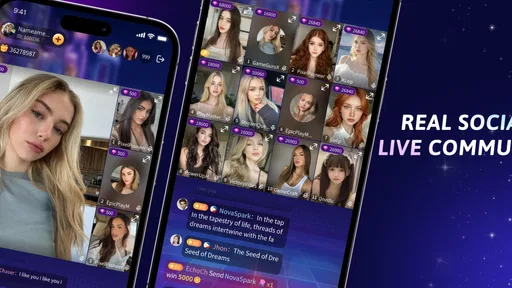


 Analysis by AppCompare
I would approach winwin as a place to spend time with other people, not as a game library I can fully judge from a quick install. Its focus is live chat and party games, so the most useful question is whether you have someone to play or talk with when you open it. If you do, the idea has an easy appeal; if you mainly want polished solo challenges, a conventional puzzle or trivia app may suit you better.
A practical first session
My advice is to start with a simple plan: open the app when a friend is available, look at the party-game options together, and treat the first visit as a trial rather than a commitment. That makes it easier to tell whether the social format is comfortable for your group. A live room can feel lively with the right people, but it is less compelling if everyone arrives at different times or expects a different kind of game.
For example, imagine a few friends waiting for food after work. One person can suggest a short round while the group is already chatting, rather than trying to coordinate a separate gaming session later. That is the sort of low-pressure moment where a party-game app can earn a place in a routine: it gives a group something to do without demanding a long evening or a serious competitive mood.
Set expectations before you settle in
winwin is a free entertainment app from SETIA, and its live-chat-and-party-game identity is more useful to keep in mind than expectations borrowed from a full-scale multiplayer title. I would not install it assuming it offers the depth, matchmaking, or progression of a dedicated competitive game. Its appeal is the combination of conversation and casual play, and that combination works best when you are happy to let the social side lead.
The app is rated for Everyone 10+, which is a reminder to make sensible choices about who is in a conversation, especially when younger users are involved. I would also check the current in-app purchase prompts before spending. Optional purchases range from $0.49 to $84.99 per item, a wide enough spread that it is worth pausing to understand what a purchase does rather than tapping through in the middle of a game.
Useful habits for a smoother group session
Because the experience centers on live interaction, a little coordination can matter more than a long setup routine. I would agree on a time, make sure everyone knows which app to open, and choose a game only after the group has gathered. This avoids the common party-chat problem where the first person is ready to play while the rest are still sorting out plans.
Keep early sessions short and pay attention to what your group actually enjoys: talking while playing, focusing on a quick challenge, or simply having a shared activity in the background. That small test gives you a better basis for deciding whether to return than judging the app from its concept alone. I would also avoid treating a casual score as a measure of skill; in a social setting, the best round may be the one that gets everyone involved.
Worth Reading Before You Choose

Flipboard Shows What News Apps Must Do Beyond the Feed

Switching to Android Auto Means Rethinking Your Driving Routine

Google Calendar Makes a Crowded Week Easier to Manage

Ludo King Makes the Most of the Minutes Between Plans

Baby Panda World Brings Quick Play to Modern Phones, but Its Game Library Feels Busy

ESPN’s Live Game View Makes Following Close Games Easier
Where it may not fit
The public response is mixed: winwin has a 2.7 average from 126 ratings, alongside 10K+ installs. I would take that as a reason to keep expectations measured, not as a verdict on how it will work for every group. A low average can reflect different experiences, and the small number of written reviews makes it harder to infer a single recurring issue. Try it with a friend before building a regular routine around it.
It is also not the obvious choice if you want a quiet, offline pastime, a carefully structured single-player campaign, or a large established social network. Live chat depends on other people being present and willing to take part. If that social energy is what you want, it is the point; if you prefer control over pace and content, a solo game or a familiar messaging app paired with a separate game may be a better fit.
What the app’s format asks of you
I see this as a social activity that works best when I bring a little intention to it, rather than opening it and expecting the app to supply a ready-made evening. Before inviting friends, I’d decide whether we want to chat casually or focus on a shared game; that small choice makes it easier to see if the format suits everyone. From there, the useful question is which expectations and spending choices to settle before a session gets going.
Know the trade-off before paying
The app is free to download, but in-app purchases are available, so I would treat spending as optional rather than part of the basic test. Its current version is 1.9.5, and it requires Android 8.0 or later. Those details matter if you are considering installing it on an older device, or if you are weighing it against an app that already fits your phone and friend group.
One practical question is whether you need to pay to enjoy the core experience. I would begin without buying anything and see whether the available chat and party-game flow is enough for your group. If a prompt appears, read it carefully and consider whether the item solves a real problem for you. A purchase is easier to assess after you know what you use repeatedly, rather than while you are still exploring.
How it compares with familiar alternatives
Compared with a standard messaging app, winwin puts the activity closer to the conversation: the group can gather around play rather than use chat only to arrange it. Compared with a standalone party game, the live social element is central rather than an optional extra. That makes it potentially handy for friends who want one shared place for casual interaction, but less attractive to someone who already has a dependable chat group and only needs a specific game.
The trade-off is flexibility. Pairing a familiar messenger with a separate game gives you more choice over each part, while a combined app can make the transition feel more direct when everyone is already there. I would choose based on your group’s habits, not on the promise of an all-in-one setup: if your friends rarely install the same apps, the simpler arrangement they already use is probably the one that gets played.
Who I would recommend it to
I would suggest giving winwin a try if you enjoy casual group play and can invite at least one person who is willing to explore it with you. It is a more natural fit for a spontaneous catch-up than for someone looking for deep solo progression. The app was released on October 31, 2025, and its modest install base may mean it is less familiar to your circle than established chat platforms, so the experience can depend heavily on whether your friends are willing to join.
For a first-time user, I would keep the decision simple: install it, arrange one short session, and judge how easily your group moves from chat into play. If the app becomes a convenient shared habit, that is a meaningful win. If coordinating people feels like more work than the game is worth, there is no need to force it; a familiar group chat and a game everyone already knows may be the better combination.
A measured verdict
winwin is an interesting fit for people who want conversation and party games to sit together, but I would approach it as a social experiment rather than an automatic replacement for other apps. Its best case is a willing group, a relaxed occasion, and expectations centered on shared fun. Its weaker case is a solo user hoping for a deep catalogue or a busy community without first bringing friends along.
My recommendation is to test the social flow before investing time or money. If your group clicks with it, the app can make an ordinary break feel more engaging; if it does not, the experience is easy to leave behind in favor of tools your friends already use. That is the clearest way to decide whether this particular mix of live chat and party play belongs in your routine.
First impressions: what’s the deal?
WinWin is like that friend who always has something fun planned. As soon as you open the app, you're greeted with a vibrant interface that's both inviting and user-friendly. It's super intuitive, and even if you're not the most tech-savvy, you'll be navigating like a pro in no time.
The premise is simple yet intriguing. It's a social gaming platform where you can participate in various challenges and games. But here’s the twist: it’s not just about playing; it’s about connecting with others in a fun and engaging way. You can join different communities, participate in contests, and even earn some exciting rewards. It’s like combining your favorite online game with a social club meeting.
The gameplay experience
Now, let’s get to the good stuff—the games. The selection is vast, and there’s something for everyone. Whether you're into puzzles, trivia, or more strategic games, WinWin has got you covered. The best part? The games are designed to be quick and engaging, perfect for those short breaks during the day.
One thing I absolutely love is the competitive element. You can challenge friends or join global leaderboards to see how you stack up against others. It's a fantastic way to test your skills and maybe even show off a bit. Plus, the app keeps things fresh with regular updates and new games, so there's always something new to try.
Community vibes
What sets WinWin apart from other gaming apps is its community aspect. It’s not just about playing games; it’s about making connections. The app encourages you to join different groups based on interests, and there’s a real sense of belonging.
The chat feature is seamless, allowing you to communicate with fellow gamers easily. It’s a great way to share tips, form alliances, or just have a chat about the latest game updates. The app does a fantastic job of fostering a positive and friendly environment, which is a huge plus in today’s digital world.
Rewards and incentives
Let’s talk about rewards because who doesn’t love a little extra motivation? WinWin offers a range of incentives for participating in games and challenges. From virtual trophies to real-world prizes, there’s plenty to aim for. The reward system is structured in a way that keeps you engaged without feeling overwhelming.
It’s not just about the rewards, though. The sense of achievement you get after completing a challenge or climbing up the leaderboard is immensely satisfying. It adds an extra layer of excitement to the whole experience.
A final word on the experience
So, is WinWin worth a spot on your home screen? Absolutely. It’s the perfect blend of gaming and social interaction, making it a standout choice in a sea of apps. Whether you’re looking to challenge yourself with some quick games, connect with a vibrant community, or just have a bit of fun, this app delivers on all fronts.
In a nutshell, WinWin is more than just a gaming app; it’s a community where you can play, connect, and win. So, why not give it a try? Who knows, you might just find your new favorite pastime.
Pros
- User-friendly interface for easy navigation.
- Real-time notifications keep you updated.
- Supports multiple languages for global users.
- Secure payment methods ensure safe transactions.
- Wide range of categories for diverse interests.
Cons
- Limited offline capabilities.
- Occasional ads can be intrusive.
- Requires constant internet connection.
- Some features locked behind paywall.
- Customer support response can be slow.
FAQs for Win Plus
What is WinWin and how does it work?
WinWin is a social gaming app designed to provide users with engaging games while offering opportunities to win real prizes. Users can participate in various challenges and competitions, earning points that can be redeemed for rewards. The app is free to download, with options for in-app purchases to enhance the gaming experience.
Is WinWin free to use, and are there any in-app purchases?
Yes, WinWin is free to download and use. However, it does offer optional in-app purchases. These purchases can enhance your gaming experience by unlocking exclusive content, providing additional challenges, or offering boosts that help you progress faster in the games.
What types of games are available on WinWin?
WinWin features a diverse range of games, including puzzles, trivia, and strategy games. The app regularly updates its game library to keep content fresh and exciting. Whether you enjoy quick brain teasers or more involved strategic gameplay, WinWin offers something for every type of gamer.
How can I win prizes on WinWin?
To win prizes on WinWin, you must participate in the various games and challenges offered on the app. As you play, you accumulate points that can be redeemed for real-world rewards. Prizes range from gift cards to exclusive merchandise, and the more you play, the more chances you have to win.
Is WinWin safe and secure to use?
WinWin prioritizes user safety and security by implementing robust encryption and privacy policies. The app ensures that your personal information is protected and never shared with third parties without consent. Additionally, all transactions, including in-app purchases, are processed securely to safeguard your financial data.


